FOUND
The meetup time disappears in chat.
Conversations move on. Even a weekly session needs someone to remind everyone. What if the next meetup had a place of its own?
 INDEPENDENT PRODUCT · DISCORD日本語
DISCORD × COMMUNITY
Game nights, weekly sessions, and events worth remembering. Share the schedule with your server, then send the reminder to the channel your friends already use.
One free month per server. No automatic charge.
Server management permission is required. Inviting the bot does not charge you or start the trial.

SHARED PLANS / SHARED PLAY
Share a server schedule.
Send the cue to your channel.
FOUND
Conversations move on. Even a weekly session needs someone to remind everyone. What if the next meetup had a place of its own?
MOVED
Share one-off and recurring reminders in a Discord server. Channel reminders and a daily schedule keep the group’s plans in view.
01
Set a one-off reminder or repeat it daily, weekly, monthly, and on other schedules.
02
Post reminders to a chosen channel. You can also schedule a daily list of that channel’s plans.
03
Server administrators decide whether regular members may create reminders.
BROWSER / GET STARTED
Invite the bot, add reminders, and view the schedule in Discord’s web app. No dedicated app download is needed.
Review the server and bot permissions on Discord’s official authorization screen, then approve the installation.
Invite the bot to Discord ↗A server administrator starts the trial through /schedule. Each server gets one trial, with no automatic charge.
/scheduleUse /schedule in the channel where reminders should appear. Choose the date, text, and recurrence; use the same command to view the schedule.
/scheduleWhen the trial ends, creating, viewing, and sending reminders stops until a subscription and representative registration are completed. Reinstalling the bot or changing members does not reset the trial.
Open Discord in your browser ↗KEEP THE PLANS GOING
Representative plan · total charged
JPY 300 / month
One subscriber can represent up to three Discord servers. Other members do not need individual subscriptions.
The limit applies to servers you represent. It is not a limit on bot installations or servers whose schedules you can view.
To continue, use the subscription option in /schedule for Stripe card checkout, then register as the server representative after payment. Billing starts when you subscribe and renews automatically at JPY 300 per month.
Open subscription management through /schedule to cancel. Access continues until the paid period ends. There is no prorated refund for a normal cancellation; contact us about duplicate charges or a service that was not provided.
iPhone & iPad app · Now on the App Store
See schedules across your servers in one place and choose which reminders notify you. With the right permissions, you can also add or edit reminders and install the bot from the app. Downloading the app, and viewing schedules and notifications as a participating member, are free (the server needs an active free trial or a subscribed representative).
For iPhone and iPad with iOS 17 or later, on the Japan App Store. The app interface is in Japanese. The representative plan is also available as an in-app subscription, auto-renewing at JPY 300 per month in Japan. You need only one subscription, either by card through Discord or in the app. Cancel through the same route you used; for in-app subscriptions, use your App Store subscription settings.
Get on the App Store (Japan)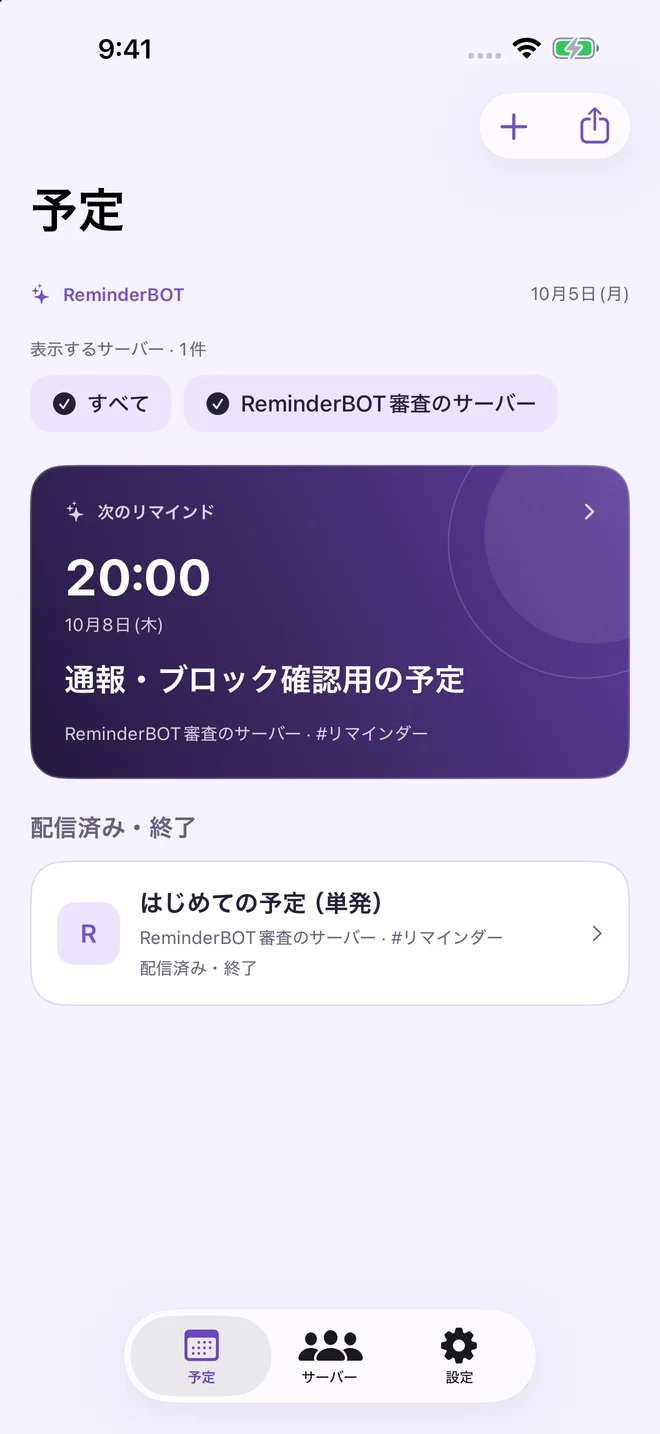
MADE FOR YOUR COMMUNITY
The Discord bot is running publicly. Invite it in your browser and start the server’s free trial. The iPhone and iPad app is available on the Japan App Store.
Use your Discord account and share plans with your server’s permissions. Bot controls appear in Japanese or English according to your Discord language setting.
An independent product planned, built, and operated by Quo. Everyday game meetups, turned into a working system. Inquiries are accepted in Japanese and English.
YOUR NEXT MEETUP
One free month · No automatic charge · Started by a server administrator
Invite the bot to Discord ↗